



























Offline music apps are becoming popular among those who want to enjoy playlists without using data or Wi-Fi. Music streaming apps offer millions of songs, but listening without Wi-Fi can be expensive. When travelling, listening to music without Wi-Fi can result in unexpected data costs. Moreover, flight travel usually warrants offline playback; you just have to download songs to enjoy your playlist while travelling.
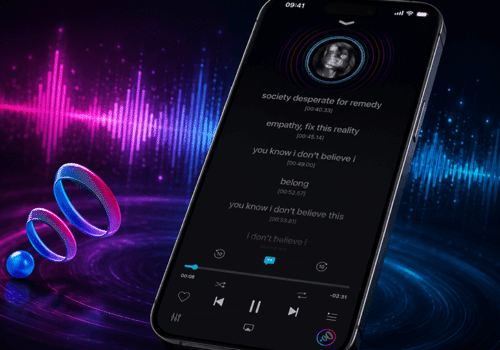
Many apps offer offline playback. Some of the online streaming apps also offer an offline playback option. In this blog, learn about Boom and its features. It is a must-have music player app for iOS. Want to know why? Read on!
What to look for in a Music Player App?
If you search for ‘offline playback’ on the App Store, you will find various apps that support offline playback. Each of these apps offers unique features, but their true value becomes clear once you start using them. Not all offline apps deliver the same results. Here’s what you need in the top offline music player for iPhone.
Boom Features Explained in Detail
Option to Download Tracks
The best music app without the internet lets you easily download or import tracks. Once you import or download a track, you should be able to play it without Wi-Fi or data.
High-Quality Audio
Sound quality plays a crucial role in your music experience. Imagine listening to your favorite track with poor audio quality. Bad experience, right? That’s why choosing an app that delivers high-quality sound is essential. Even if you’re a casual listener, high-quality audio and effects like 3D surround sound will elevate your listening experience.
Easy File Management
A well-organised music library saves time. You know where your playlists are or where your favourite tracks are saved. Apps like Boom make it easy to sort tracks by creating folders, naming, and renaming them. They offer complete control over your music collection.

3D surround sound music player app iOS Boom
Format Support
Your offline music player app should support a variety of audio formats. It should support common formats like MP3, AAC, FLAC, and WAV. These formats ensure your music plays seamlessly while delivering high-quality audio.
Easy-to-Use
A simple interface is a must in a music app; it can make a huge difference by offering smooth controls. You should be able to easily find songs, create playlists, and adjust sound settings. This will make your experience more enjoyable and comfortable.
Additional Features
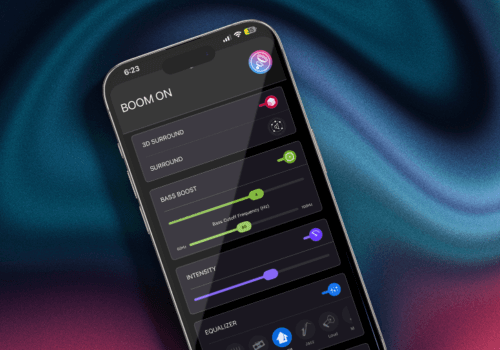
What if your music player offers more than just a basic listening experience? That would take your experience up a notch, right? Apps that offer bass boost, 3D surround sound, equaliser settings, and other features help you personalise sound.
A music player app like Boom has all these features. Boom offers a personalized experience and makes your listening experience more fun. Moreover, it is compatible with ANY headphones. It has a simple interface and can elevate your listening experience. If you have an iPhone and are a music lover, Boom is the perfect app for you.
Best Offline Music Apps for iPhone
Boom: Best offline Music app for iPhone
Boom is a high-quality offline app that will change the way you listen to music. What makes it different from other apps is the amount of control it gives you to personalize sound. It offers immersive listening with 3D surround sound, an equalizer, and various other features. Additionally, it helps keep your downloads and playlists organized.
Apple Music: Curated Playlists
Apple Music is one of the best apps for enjoying offline music. It offers seamless iPhone integration. You can download tracks and enjoy music wherever you go. It also offers personalized recommendations and curated playlists.
Spotify Premium: Offline Access to Playlists
Spotify Premium lets you download songs, podcasts, and playlists. It offers a vast music library, you can easily create a playlist, and listen to it offline. Moreover, it also offers personalized recommendations. However, to enjoy offline downloads, you need to get a paid subscription.

Offline music listening during travel (flighttrain)
Boom vs Other Music Apps
| Feature | Boom: Bass Booster and Equalizer | Apple Music | Spotify |
| Popular For | Offline music playback and audio enhancement | Streaming and offline downloads | Streaming and offline downloads |
| Works Without Internet | Yes (Access to full library) | Yes (Downloaded songs only) | Yes (Premium downloads only) |
| Audio Customization | 3D surround sound, 8 or 16-band equalizer, and more | Basic EQ | Limited in-app EQ |
| File Format Support | MP3, AAC, WAV, FLAC, and more. | Apple ecosystem focused | Streaming format only |
| Subscription Required | No (Works with existing local music) | Yes (Subscription required) | Yes (Premium required) |
| Sound Enhancement | Advanced | Minimal | Minimal |
| Best For | True offline listeners | Apple ecosystem users | Streaming and discovery lovers |
Bottom Line
These are some of the top offline music apps. Boom stands out because it offers complete control over your playlists and also offers audio enhancement options. In this offline music apps comparison, Boom is the best choice for listeners who want to enjoy an immersive listening experience. Download Boom from the App Store and change the way you listen!
FAQs
Are offline playback apps safe to download?
Most popular apps are safe to download. Make sure you download them from the App Store.
Do offline music player apps offer sound customisation?
Yes, apps like Boom offer a personalized listening experience with their various features.
What music apps can you use offline?
The best offline music apps are Boom, Apple Music, and Spotify.