









































Good equalizer settings can change how you listen to music on your headphones. Every music genre is different, and each headphone type differs too. The right headphone EQ settings can elevate your music listening experience.
Whether you like rap, hip-hop, classical, or other genres, if your headphones don’t perform up to the mark, you’re left disappointed. Learn how to improve your listening experience with the right EQ settings. With a few simple tips, you can turn your ordinary headphones into extraordinary-sounding ones. Are you ready to experience immersive sound? If yes, read the following section.
Why Every Music Genre Needs Different EQ Settings
Every music genre is different. Rock music is completely different from Classical music; they emphasize different parts of the frequency spectrum. If you use the same EQ settings for every genre, you will not enjoy music to its full potential. It can sound dull or muddy. Adjusting the EQ can help you enjoy your music better.
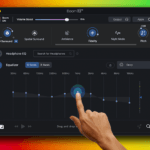
Every genre requires unique settings to enjoy your favorite track to the best. Genre-specific EQ can help you enjoy music personalized to your choice. Audio enhancement apps like Boom 3D offer genre-specific EQ presets and a 31-band equalizer to fine-tune sound to your personal preference.

How to adjust headphone equalizer correctly
Best Equalizer Settings for Different Music Genres
Every genre is different, so using the same EQ settings may not give you the best listening experience. You can adjust the equalizer based on the type of music you’re listening to. Here are some of the best EQ settings for different music genres.
Pop: Pop songs are about clear vocals and catchy melodies. Try giving the mid frequencies (1kHz-3kHz) a gentle boost to make vocals stand out, and add a slight lift to the bass (60Hz-100Hz) for a warmer, fuller sound.
Rock: Rock music shines when guitars, drums, and cymbals sound energetic. Increase the mid-bass (100Hz-200Hz) to give kick drums more impact, and raise the treble above 8kHz slightly to bring out the crispness of guitars and cymbals.
Classical: Classical music is best enjoyed when natural details are preserved. Keep the bass fairly neutral, while slightly boosting the 500Hz-1kHz range to add warmth and help orchestral instruments like violins, cellos, and woodwinds sound richer and more lifelike.
Hip-Hop: Hip-hop generally relies on strong bass. Increase the sub-bass below 60Hz to add depth and power, while keeping the mid frequencies balanced so vocals remain clear and easy to hear without being overwhelmed by the low end.
Give this blog a read: Spatial Surround vs Spatial Stereo: What’s the Difference.
Benefits of Fine-Tuning Your Headphone Audio
Just a few minutes spent adjusting equaliser settings can make a huge difference in how your headphones sound. Here are some of the benefits:
Hear more detail in every track: A well-balanced EQ helps vocals, instruments, and background elements come through more clearly, making music sound immersive and rich.
Enjoy longer listening sessions: When certain frequencies aren’t too harsh or overpowering, your ears aren’t strained, helping reduce listening fatigue.
Create a personalised sound experience: Whether you enjoy hip-hop, rap, or classical music, custom EQ settings let you enjoy music suitable to your listening preference.
Headphone EQ Settings for All Songs
When it comes to music, the choices are different. Some listeners may like heavy bass, and some prefer soft melody. If you want the best EQ setting for your headphones, you should try the “Headphone EQ” feature of Boom 3D.
It helps you enjoy balanced and accurate sound on your specific headphones. It balances different frequency ranges, and you can enjoy clear sound on your headphones. Boom 3D supports over 5,000 headphone models. To get the best possible output for your headphones, try the “Headphone EQ” feature.
You may find this blog informative: What is Spatial Surround Sound: How It Works for Music, Movies & Games.
Use Presets
Another way to improve your music listening experience is to try presets. Boom 3D offers a list of various presets to match your listening preferences. If you want to skip fine-tuning equalizer settings manually, you can use ready-to-use presets and enjoy a great music listening experience tailored to your choice. Whether it’s trap, rock, pop, or classical, you can find all presets with Boom 3D.

Best equalizer settings for classical music
Bottom Line
The best headphone EQ settings depend on your listening preferences. Spend a little time exploring and tweaking the EQ to learn what works best for you. Download Boom 3D to help you explore and have your playlist sound its best.
FAQs
Can EQ damage headphones?
EQ adjustments won’t damage headphones. However, high bass boost and very high volumes may cause distortion.
How to set my equalizer to enjoy the best sound?
It all comes down to your preference; you can try Boom 3D’s Headphone EQ feature for balanced sound on your headphones.
Do expensive headphones need EQ settings?
Yes, even your expensive headphones need EQ settings to enjoy music tailored to your taste.
Should I use presets or manually tweak equalizer settings?
Start with presets if you’re new to equalizers. When you manually adjust EQ settings, you can fine-tune the sound for a specific pair of headphones and your listening preferences.
Which app is good for headphone EQ
You can download Boom 3D to try the Headphone EQ feature. It also offers advanced equalizer control, presets, and other features to improve your listening experience.









Pingback: Boom 3D for Windows ARM64: Immersive Audio on ARM PCs - GD
Pingback: Boom 3D: The best Audio Enhancement App for Mac & PC - GD