









































A catchy track can quickly capture attention. To create viral tracks, you should experiment with vocals, instruments, and remixes. Various AI-powered audio tools can help you create unique mixes.
AI-stem separation apps like AuDimix let you experiment with individual elements such as vocals, drums, bass, piano, and other backing instruments. You can separate a track into five stems, adjust their levels, change pitch or tempo, preview the result, and export either an individual stem or a customized mix.
AI Stem Separation: Create music with AI
AI stem separation tools analyze a music track and separate it into individual elements. Experiment with individual stems and create your own a cappella track. Here is what you can do with individual stems.
| Stem | Creation |
| Vocals | Create a cappellas, vocal-focused edits, or karaoke versions. |
| Drums | Emphasize rhythm for short-form edits. |
| Bass | Strengthen or reduce the low-end foundation. |
| Piano | Isolate keys for practice or remixing. |
| Backing Instruments | Creates space for new musical ideas. |
With an AI music editing app, you can separate vocals from music. AuDimix uses AI-powered track separation to extract five stems and allows users to adjust them individually.
AuDimix is one of the best AI audio tools for turning an existing song into something new without just applying effects.
This blog is worth a read: Best apps for social media creators.
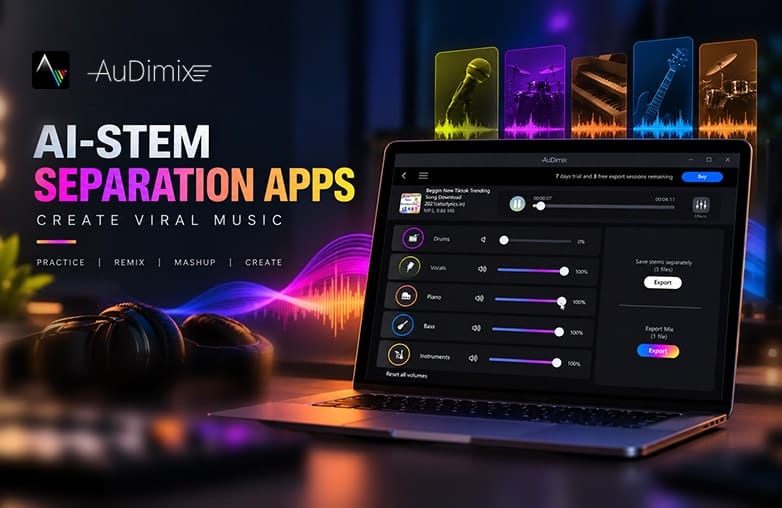
AuDimix AI stem separation -separate vocals from music
How to Create Viral-Ready Music with AuDimix
Choose the Right Track
Your first step in music remixing with AI or isolating vocals from a track is to find tracks with clear musical structure and elements you want to highlight. They could be vocal lines, bass sections, drum patterns, instrumental hooks, or piano melodies.
AuDimix supports high-quality audio formats such as MP3, WAV, M4A, and FLAC, and more, offering flexibility when importing music. One important thing to consider is to have appropriate rights or permission to use the music in your content. Separating a track does not remove copyright restrictions.
Separate the Music Into Stems
Import the song into AuDimix to separate tracks. You can experiment with individual music stems. Explore creative possibilities; you can decide which parts of the arrangement should stand out.
For example, if you are creating a singing video, you can isolate the vocals and create an instrumental backing track, or if you want to create a dance video, you can emphasize bass and drums.
Experiment with Stem Levels
Change how a track sounds by changing the balance between its components. Try lowering the vocals while keeping the instruments prominent, or reduce the backing instruments and bring the vocals forward. AuDimix lets you adjust individual stem levels, so you can experiment with different versions of the same track without starting from scratch.
Listen to each adjustment carefully and decide what sounds best. Even small adjustments can create a unique mix and can make your track go viral on social media or other platforms.
Read this blog for interesting details: How to create professional voiceovers for social media videos.
Use Pitch and Tempo
A slight change in pitch or tempo can make a track feel different. AuDimix lets you adjust pitch and tempo, offering flexibility when working with separated tracks. As part of an AI music stem separation workflow, you can isolate the vocals and instruments you want to work with and then experiment with how they sound.
For example, you can slow down a vocal section to match the video visuals, slightly change the pitch to suit your voice range if you’re singing along, or adjust the timing of an instrumental part of a remix. This makes stem separation for music useful. It’s more than just isolating individual tracks; it offers you more control over the sound. However, extreme pitch and tempo changes can make music sound unnatural; always preview your edits and edit them to your satisfaction.
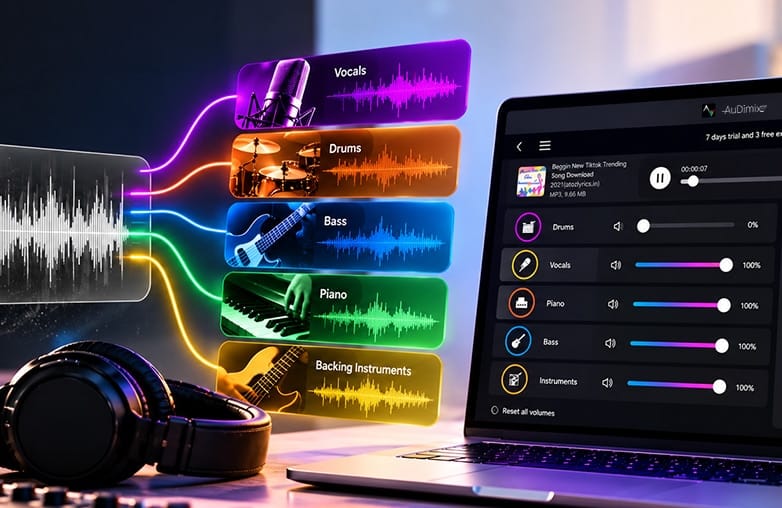
AI music stem separation for social media music creation
Bottom Line
It’s time that you create viral-ready music with AI. Follow these simple steps and use AI stem separation apps like AuDimix to experiment with a track and make it stand out.
With AuDimix, singers can create instrumental backing tracks, musicians can practice along with selected instruments, DJs can create a capellas, remixes, and mashups, and music producers can experiment with individual music elements. YouTubers can prepare music for their video content; short-form creators can build personalized audio for reels and shorts.
FAQs
How do I start making music with AI?
Start by using an AI instrument separator tool like AuDimix to separate, edit, or enhance musical elements. Begin with a simple idea and experiment with different elements.
How can I make my song better with AI?
AI can help improve any track by separating stems, adjusting vocals and instruments, changing pitch or tempo, and creating a balanced mix.
What makes music go viral?
Relatable lyrics, a memorable hook, strong visuals, and catchy music can make a track popular.
Is AI stem separation useful for social media creators?
Yes, social media creators can use AI stem separation to customize music for short and long videos.
Can AI turn an existing song into a remix?
AI stem separation can help isolate vocals, drums, bass, piano, and other instruments that help you create a remix or mashup.










Pingback: How to Start a Podcast on Spotify: Recording Guide - GD