


























Do you play games, listen to music, and watch movies on your Mac? If yes, you’ve probably felt that the bass doesn’t always hit the way it should. Mac’s built-in speakers are great, but bass lovers and audiophiles often seek ways to enhance sound quality. If you’re looking for ways to elevate your listening experience, you need more than just a built-in speaker.
To enhance bass on a Mac, use a 31-band equalizer like Boom 3D, adjust frequency bands between 60Hz–150Hz, update macOS, and check speaker condition for distortion.
There are several ways to enhance bass on Mac without replacing your laptop. Simple audio tweaks, changing sound settings, and a few other advanced options can improve the bass and clarity of Mac speakers. In this blog, we will guide you through various steps to enhance bass, minimize distortion, and experience immersive sound on your Mac.
Download Equalizer & Volume Booster to Enhance Bass on Mac
The best way to enhance and customize sound to your choice is to download volume boosters and equalizer apps. Your Mac’s built-in speakers have certain audio limitations, which can make them sound underpowered, especially when listening to music, watching movies, or playing games. Even at maximum volume, they may lack depth.
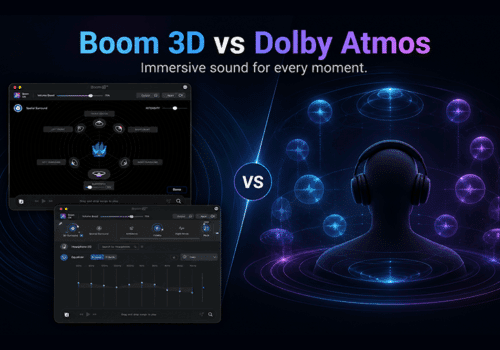
This is when you should download a volume booster and equalizer app, such as Boom 3D. You can boost the app and increase the volume beyond ordinary limits without distortion. Moreover, it offers options to customize audio. You can fine-tune audio with a 31-band equalizer with presets, audio effects, Headphone EQ, AirBoom, and more. Download Boom 3D and elevate your listening experience. The best part about Boom 3D is that it is compatible with ANY headphones.
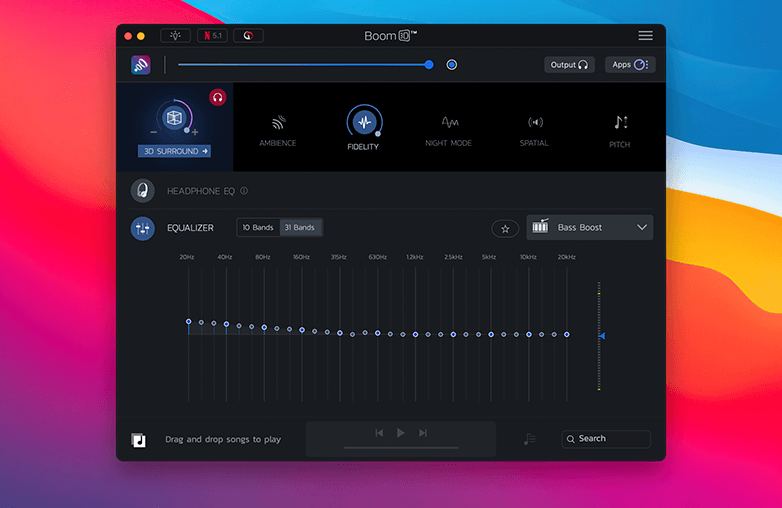
Boom 3D EQ panel
You may find this blog helpful: How to Fix Low Volume Issues on Mac?
Best EQ Settings to Bass Boost on Mac
If you want to fine-tune your Mac’s audio, start with the Mac’s built-in audio controls. Go to System Settings > Sound to manage basic input and output options for your speakers, headphones, and microphone. These controls offer very limited flexibility when it comes to fine-tuning sound.
If you want to bass boost on Mac speakers and improve speaker clarity, consider downloading an equalizer app. Apps like Boom 3D will give you complete control over your Mac’s audio. It offers a 31-band equalizer, and you can individually adjust frequency bands to add clarity and enjoy a personalized listening experience. Whether you want a subtle Mac bass boost or a more powerful boost, Boom 3D can help you fine-tune audio to your taste.
You can also read this blog: How to Improve Sound Quality on Mac?
| Feature | Built-in Mac Audio | Boom 3D |
|---|---|---|
| Bass Control | Limited | 31-band EQ |
| Volume Boost | No | Yes |
| Presets | No | Yes |
| Headphone EQ | No | Yes |
Keep Your Mac Audio Updated
One thing we usually miss out on while trying to improve clarity in Mac audio is checking whether system software is up to date. Apple’s updates include sound optimization, which can positively affect bass response. It can improve the clarity of your Mac audio.
To check for updates, go to System Settings > General > Software Update. Install any available updates. This ensures your Mac is running the latest audio enhancement features. It also helps your Mac work more smoothly with Mac Equalizer Bass settings and with third-party audio enhancement apps. The result you get is strong bass and clear audio on your MacBook.
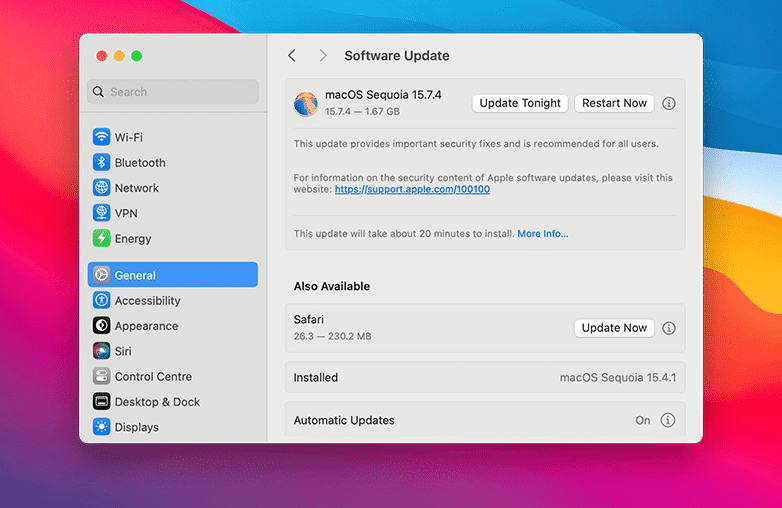
Best EQ settings for Mac
Check the Condition of Your MacBook Speakers
If your Mac speakers sound flat no matter what advanced settings you use, you will end up getting no results. The issue may not be software-related at all. Internal speakers may lose efficiency due to daily use, physical damage, or dust buildup; the reasons can vary. This is why your Mac may sound flat.
To examine your speaker’s health, unplug any external devices like Bluetooth speakers or headphones, so that you’re testing only the built-in software. Now, play a track with noticeable bass and clear vocals. Pay attention to warning signs such as crackling sounds, distortion, or uneven tone between right and left speakers.
If using the best EQ settings for Mac or trying to enhance bass on Mac doesn’t improve the sound, it’s likely a hardware limitation. You can seek professional help to restore speaker performance.
Give this blog a read: Speed Up Mac: Complete Tested Guide.
Bottom Line
You can enhance the sound quality of your Mac with simple tweaks. Follow the above steps to enhance bass and improve clarity from your built-in speakers. If you want to personalize sound and take your listening experience to the next level, download Boom 3D on Mac or Windows.
Boom 3D offers various features to customize sound and to enjoy the level of bass you love. It works perfectly with ANY headphones, and it also offers a 30-day free trial without asking for payment details. If your goal is to enhance bass on a Mac and enjoy personalized sound, try Boom 3D.
FAQs
How to enhance Bass on a Mac without external speakers?
You can enhance bass by using volume boosters and equalizer apps such as Boom 3D. It will increase your system’s volume beyond ordinary limits without causing distortion.
What are the best EQ settings for Mac speakers?
There is no one-size-fits-all setting; it comes down to your personal preference. You can experiment with different EQ levels and check what works best for you.
Can audio enhancement software improve the sound quality of my Mac?
Yes, audio enhancer software for Mac can improve the audio quality, and you can clearly notice the difference.
References:
Improving Bass Performance on Your MacBook Pro – My Computer Works
How I Improve Sound Quality on Mac – Medium
Improve Audio Output from Mac – Setapp