






































Equalizers help personalize sound, but there are various types, and it’s an arduous task to pick one that suits your musical taste. When you’re listening to your favorite song, how many times have you wondered what it would sound like if you fine-tuned the bass, treble, and other settings?
Whether you’re listening to music, watching movies, or playing, the right equalizer setting will change how you hear. It can help elevate your listening experience. In this blog, we will discuss Auto EQ vs Manual EQ. If you’re confused about which EQ to choose, this blog will help you.
What is an Equalizer (EQ)?
An equalizer (EQ) is a tool that lets you increase or reduce specific frequency ranges within a sound. EQ gives you control over frequencies so you can highlight certain parts of the sound while softening others.
In audio equalization, EQ adjustments fall into two categories:
Corrective EQ: It is used to reduce unwanted frequencies such as muddiness, harshness, low-end rumble, or resonant peaks.
Creative EQ: It is used to enhance sound by adding punch, warmth, and brightness.
One thing you need to understand is that there is no perfect EQ setting. The right adjustment depends on your music taste. For instance, a vocal that sounds balanced on its own may need different EQ once other instruments are added, while a powerful bass can easily overpower the kick drum if both occupy the same frequency range. EQ helps create the right balance so every element has its own space.
You may find this blog informative: What is Spatial Surround Sound: How It Works for Music, Movies & Games.
Auto EQ automatically optimizing headphone
What is AutoEQ?
AutoEQ is a tool designed to help your headphones produce a more accurate and balanced sound through equalization. You simply choose your headphone model and the equalizer app you use, and adjust a few settings if needed.
AutoEQ doesn’t apply equalization in real time. Instead, it generates EQ settings that you can import or manually enter into compatible equalizer apps. It supports presets, and most popular audio enhancement apps have ready-to-use presets.
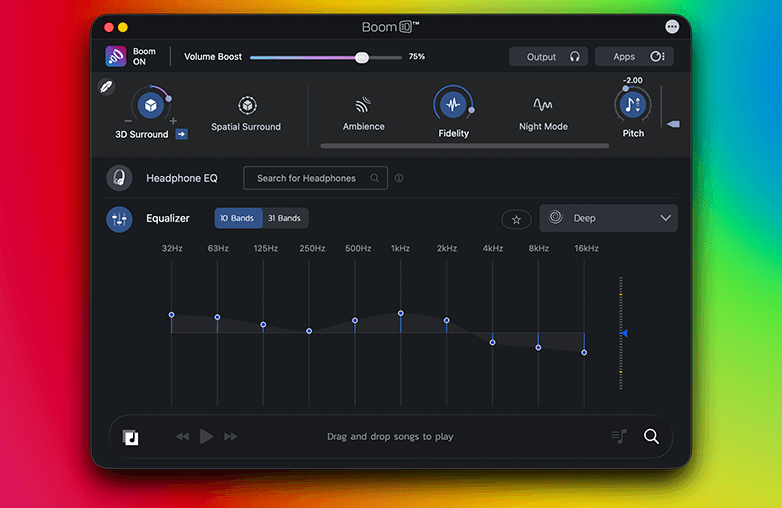
Boom 3D, the best volume booster and equalizer app, offers this feature, called “Headphone EQ”. It offers support for over 5,000 headphone models; you can select your headphone type and get balanced and accurate sound on your headphones.
You may like what this blog has to offer: Spatial Surround vs Spatial Stereo: What’s the Difference.
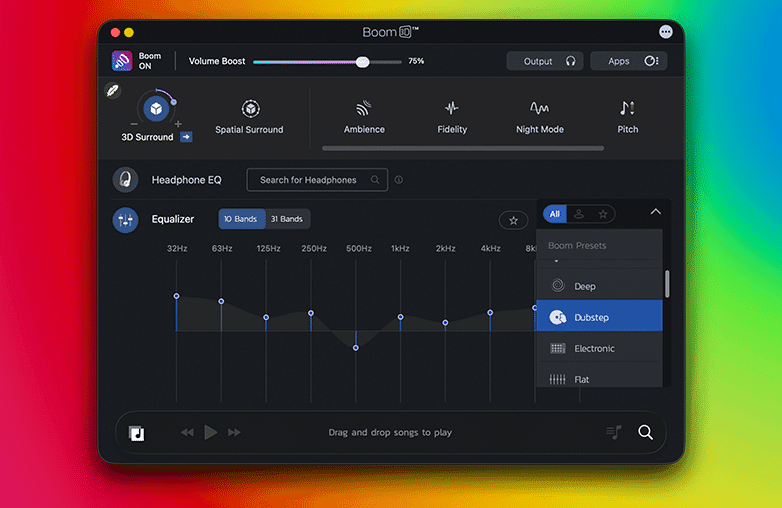
Auto EQ vs Manual EQ feature comparison
What is Manual EQ
Manual EQ helps you adjust frequency according to your music taste. You have to fine-tune the frequency. If you’re new to equalizers, you can try presets and then experiment with customizing your sound. It offers complete control to personalize sound. If you want stronger bass, you can boost frequencies around 60-100 Hz. To get clear vocals, raise frequencies around 1-3 kHz, and if you want less harshness, lower the frequencies in the 6-8 kHz range. These are small adjustments that can make a huge difference to your listening experience.
Auto EQ vs Manual EQ
| Feature | Auto EQ | Manual EQ |
| Ease of Use | Easy | Requires some Practice |
| Customization | Limited | Unlimited |
| Setup Time | Seconds | Several minutes to longer |
| Best For | Beginners | Audiophiles |
| Accuracy | Depends on preset quality | Depends on user skill |
| Consistency | High | Can vary |
| Learning Curve | Minimal | Moderate to high |
Benefits of Using Auto EQ
- Beginner Friendly
- Saves time
- Balanced sound
- Reduces guesswork.
Benefits of Using Manual EQ
- Complete sound control
- Works for every genre
- Good for gaming, music, and movies
- Great for experienced users.
This blog might catch your interest: What is Trap Music?
Best Software to Experience Auto EQ and Manual EQ
You can experience both Auto EQ and Manual EQ with Boom 3D. It is one of the best volume booster and equalizer apps for Mac. The Auto EQ feature is named “Headphone EQ”, and it supports over 5,000 headphone models. With Headphone EQ, you can enjoy balanced and accurate sound on your headphones.
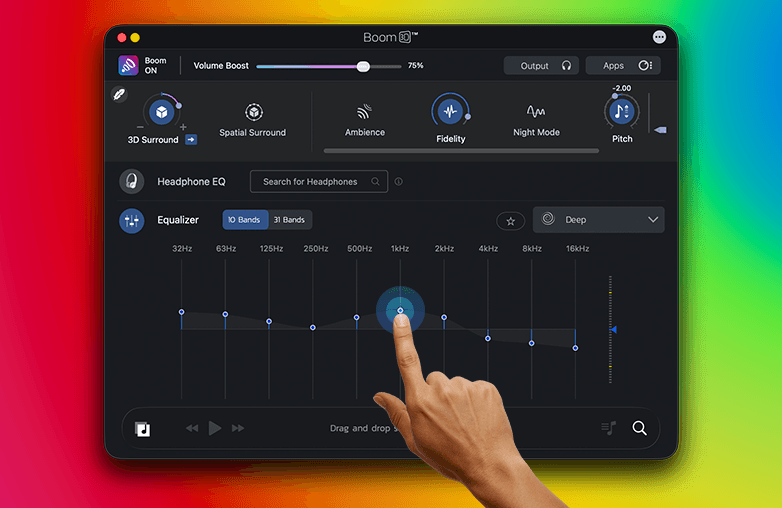
Boom 3D also offers Manual EQ with a graphic equalizer to fine-tune sound to your taste. Boom 3D offers a 10 or 31-band equalizer and various presets to match your media content. With Boom 3D, you can have complete control over the sound and make your listening experience extraordinary. Download Boom 3D for your Mac today!
Bottom Line
Now that we compared Auto EQ vs Manual EQ, the choice depends on what works best for you. If you want to try both, Download Boom 3D for Mac.
No matter what you choose, the use of an equalizer will change the way you hear and enjoy sound.
FAQs
What is the difference between Manual EQ and Auto EQ?
Manual EQ lets you adjust individual frequency bands, while Auto EQ applies optimized equalizer settings based on headphones or presets.
Is Auto EQ better than Manual EQ?
It all comes down to your preference. Auto EQ is great for beginners and quick improvements. Manual EQ offers complete control over sound and is great for experienced users.
Does Auto EQ improve sound?
It is designed to correct your headphones’ frequency; the result you get is clear and balanced sound.
Can beginners use Manual EQ?
Yes, beginners can use Manual EQ, but it takes time to make the perfect sound adjustments and to learn your preferences.
Does excessive boosting affect sound quality?
Excessive boosting can cause distortion and make sound imbalanced and unnatural.
Which EQ is best for gaming?
Both Auto EQ and Manual EQ are great for gaming. It all comes down to personal preference.
References:
https://manuals.marantz.com/NR1510/NA/EN/GFNFSYuyviicam.php
https://support.litheaudio.com/portal/en/kb/articles/manual-eq-filter-modes-explained
https://github.com/jaakkopasanen/AutoEq/wiki/How-Does-AutoEq-Work%3F
https://medium.com/@jaakkopasanen/make-your-headphones-sound-supreme-1cbd567832a9











Pingback: Boom 3D: The best Audio Enhancement App for Mac & PC - GD
Pingback: 31-Band Equalizer: The Best Equalizer for Personalized Sound - GD
Pingback: Boom 3D for Windows ARM64: Immersive Audio on ARM PCs - GD